Change a drive’s volume serial number
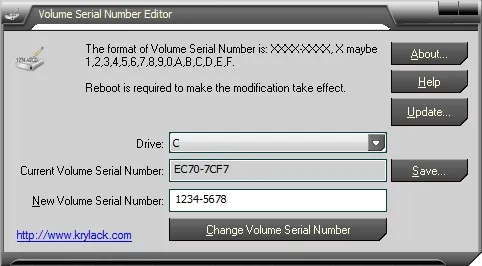
Volume Serial Number Editor lets you view and change the volume serial number — the XXXX-XXXX identifier
Windows assigns to a disk volume when it’s formatted. It works across the common Windows file systems —
NTFS, FAT, FAT32 and exFAT — and changes the serial without reformatting the drive.
A command-line edition (32-bit and 64-bit) is included for scripting and automation. Use it on drives you own or administer.
Downloads
Purchase options
All licenses include free lifetime upgrades.
| License | Price | |
|---|---|---|
| GUI edition — single license | $14.95 | Buy |
| Command-line edition — single license | $12.95 | Buy |
| GUI + Command-line bundle | $19.95 | Buy |
| Unlimited company license (more than 10 computers) | $149.95 | Buy |
What is a volume serial number?
It’s a number the operating system generates and assigns to a disk volume at format time, shown as XXXX-XXXX
(each X is a hexadecimal digit). Normally there’s no supported way to change it without reformatting the
volume; this tool changes it directly.
Frequently asked
Which file systems are supported? NTFS, FAT, FAT32 and exFAT.
Is there a command-line version? Yes — a console edition is included (x86 and x64) for scripts and automation.